Upgrading Your ServiceNow Integration to Comm Widget 2.0
Requirements:
- Comm Widget 2.0 requires BPCC 5.36.0 or later
Migration to Comm Widget 2.0
Migrating from Universal Repeater
Follow the ServiceNow Integration Configuration guide to install the Bright Pattern Omnichannel Communications for ITSM application package from the Now Store.
Alternatively, if you do not have access to the Now Store or a production instance of ServiceNow, follow the ServiceNow Integration Configuration Manual Installation guide to manually install the file labeled Communicator Widget.
The new integration package contains updated scripts required to enable new features, including on-screen object tracking for click-to-call and associated records functionality.
Migrating from Comm Widget 1.0
- Navigate to OpenFrame > Configurations by searching for OpenFrame in the admin UI's search bar, and clicking Configurations in the sub-menu.
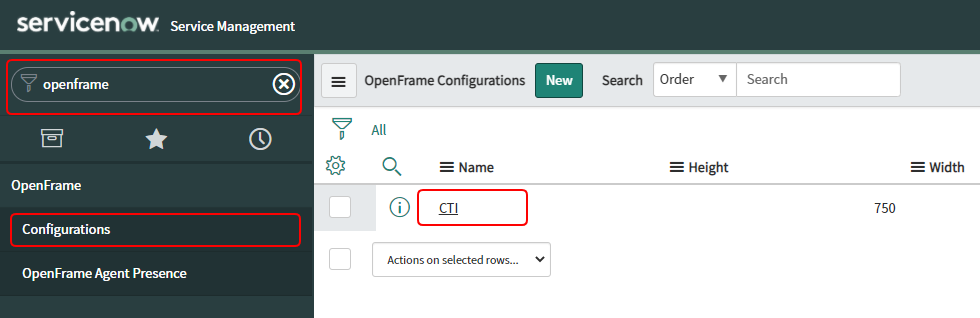
Search for "OpenFrame" and open the Configurations list - In the OpenFrame Configurations list, click on the CTI configuration.
- In the OpenFrame CTI Configuration editor, locate the Configuration field. Within this object, replace the
"bpatternAdapterUrl"line with"bpatternAdapterUrl": "https://{tenant_origin}/agent/crmembedded/adapters/servicenow.html" - Click Update to save your changes.

Using Multiple Widget Versions Concurrently
In both of the above cases, it is possible to have both the old and the new integration active in the same ServiceNow instance for testing and gradual migration purposes, with the following exceptions:
- Widgets cannot run simultaneously for the same user, as only one CTI Openframe record can be assigned per user
- Running them in parallel org-wide requires splitting access by user role
- For example, assigning users with RoleA to the old CTI Openframe record, and users with RoleB to the new CTI Openframe record.
- Switching users back and forth between the widget versions is done via CTI Openframe record reassignment. No other configuration updates are required.
Procedure
- If migrating from Universal Repeater: Install the new application package as described above.
- Create a second Openframe Configurations record with the
"bpatternAdapterUrl"key set to"https://{tenant_origin}/agent/crmembedded/adapters/servicenow.html" - Select an existing User Group, or create one new. Assign them to the new Openframe record. Make sure to exclude this User Group from assignment to the old Openframe record, if applicable.
< Previous | Next >