
タイトルとコントロールキー
読み取り専用モードでは、以下のフィールドとコントロールキーが表示されます:
- タイトルとメニューバー
 ウォールボードセレクター :パーソナルまたはグローバルウォールボードを選択します。
 矢印:ウォールボード間の切り替えを実行します。
 メニューアイコン は、ウォールボードの操作を実行します。


ウォールボードのカスタマイズという権限を付与されたユーザーの場合は、編集モード中にウォールボードに追加要素が表示されます:
 タイトルフィールド:ウォールボードの名前を変更します。
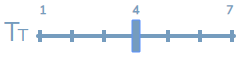 フォントサイズ:ウィジェット内のヘッダーフォントサイズおよびグリッドウィジェット内のテキストフォントサイズを調整します。
 テーマセレクター:ライト系またはダーク系のテーマを選択します。
 保存ボタン:編集モードで行われた変更を保存します。


Hide Title Bar
An option in the menu called Hide Title Bar controls the title and controls display in View mode. If the Hide Title Bar option is enabled, it is hidden until the user’s mouse hovers over the border area over the top row of cards (i.e., spaces on the wallboard). When Hide Title Bar is disabled, the title reappears, shifting the content down on the display. Once the mouse has left the title area, the title disappears, shifting the content up.


Font Size Views
While in Edit mode, the font size control allows you to adjust the header font size in widgets as well as the text font size in the Agent Grid widget and the Service Grid widget. Enlarging the font size in grids widgets is useful for examining the detailed information they contain. The font slider has seven presets, allowing you to determine the best size for your wallboard. The following images illustrate how the enlarged text looks in an Agent Grid widget. Note that enlarged text works best with fewer widgets.


