提供: Bright Pattern Documentation
Created page with "5.3:QM/エージェント/評価の表示方法" |
Created page with "= 評価の表示方法 = 全ての対話の評価はエージェントデスクトップのセクションである''私の評価''にあります。" |
||
| Line 1: | Line 1: | ||
= | = 評価の表示方法 = | ||
全ての対話の評価はエージェントデスクトップのセクションである''私の評価''にあります。 | |||
Each evaluation is sorted according to type: | Each evaluation is sorted according to type: | ||
Revision as of 17:34, 23 February 2020
• English
評価の表示方法
全ての対話の評価はエージェントデスクトップのセクションである私の評価にあります。
Each evaluation is sorted according to type:
The following procedure shows you how to find and view your evaluations.
Procedure
- On the Agent Desktop application’s navigation bar, click on the Quality Management icon.

- The Eval Home screen appears, which is where you will find links to all evaluations for your customer interactions.
- In the My Evals section on the left side of the screen, you will find a column of clickable search preset buttons that display counters (i.e., numbers) of the evaluations available in a specific status:
- Pending confirmations - The evaluations of your interactions that you need to accept or reject
- Accepted - If you are an agent, the evaluations of your interactions that have been accepted/confirmed by anyone; if you are an evaluator, the evaluations submitted by this evaluator and accepted by anyone.
- Disputed - If you are an agent, the evaluations of your interactions that have rejected/disputed by anyone; if you are an evaluator, the evaluations submitted by this evaluator and rejected (but not reopened yet).
- Failed - The evaluations of your interactions that do not have a high enough score to be considered passing
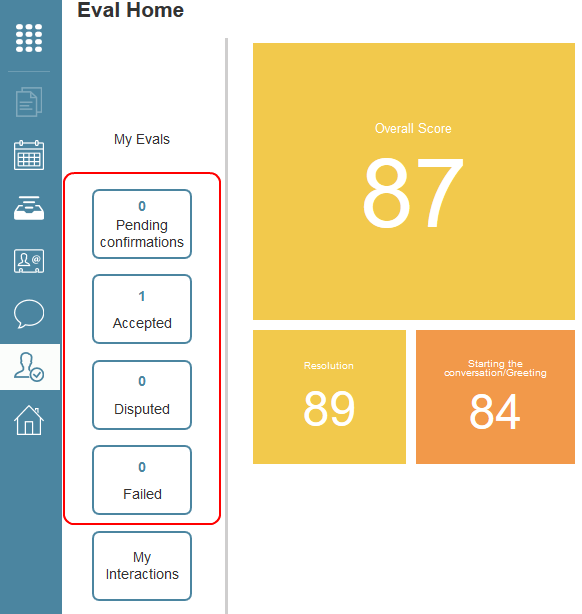
My Eval shows your evaluations and interactions
- Pending confirmations - The evaluations of your interactions that you need to accept or reject
- Click on one of the search preset buttons to go to a list of interactions of the given type.
- To view an evaluation, double-click on the selected interaction; it will launch in Eval Console. From here, you can view the evaluation on the right side of the screen.
< 前へ | 次へ >

