提供: Bright Pattern Documentation
• English
自己評価の実施
エージェントは自己評価という権限を付与された場合、自己評価を行うことができます。自己評価を行うには、指定された評価エリアで自分で処理した対話の品質をレビューおよび評価し、評価フォームの質問に回答します。完了した自己評価は、品質評価者またはスーパーバイザーによって確認されます。詳しい情報については、 評価の実施をご覧ください。
Procedure
- On the Agent Desktop application’s navigation bar, click on the Quality Management icon.

- The Eval Home screen appears. In the My Evals section on the left side of the screen, click on the search preset button called My Interactions. This preset searches for your interactions from a set amount of days.
- Double-click on one of your interactions from the list. This will bring up the interaction in the Eval Console, which is where you will be evaluating your interaction. Eval Console shows tools and controls for recording playback, an evaluation form, a notes area, the chat transcript (if applicable), and so on.
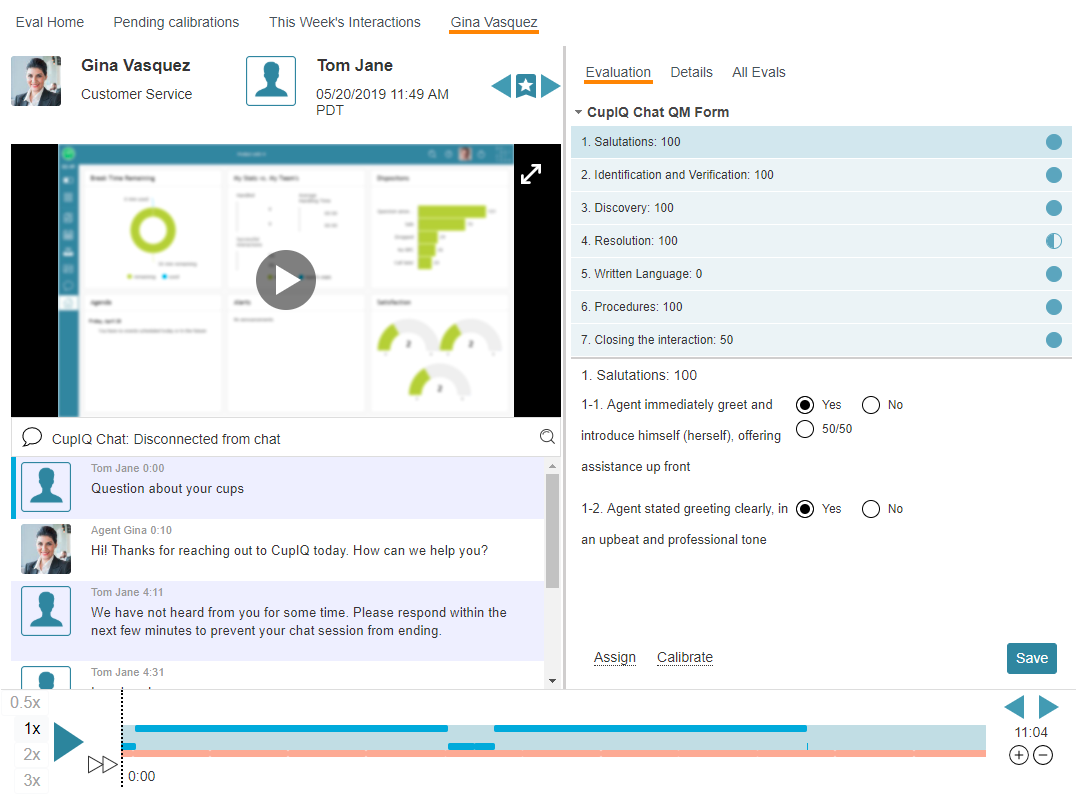
Example Eval Console showing interaction details and an evaluation form - Use the tools and controls to listen to the call recording, watch the screen recording, read the chat transcript, and/or review the email.
- During the review, click on each numbered area of the evaluation form on the right side of the screen, and answer the questions on the form.
- When you are done, click Save.


What Happens Next
If confirmation rules are enabled in your contact center, a supervisor or quality evaluator will accept or reject your self-evaluation.