提供: Bright Pattern Documentation
No edit summary |
No edit summary |
||
| Line 7: | Line 7: | ||
== 手順 == | == 手順 == | ||
# コンタクトセンター管理者アプリケーションの''設定 > ユーザー & チーム > 役割> プロパティタブ''へ進みます。<br /><br />[[File:CCA-QM-Privileges-5310.PNG|center|thumb|800px|設定 > ユーザー & チーム > 役割> プロパティタブ]]<br /><br /> | # コンタクトセンター管理者アプリケーションの''設定 > ユーザー & チーム > 役割> プロパティタブ''へ進みます。<br /><br />[[File:CCA-QM-Privileges-5310.PNG|center|thumb|800px|設定 > ユーザー & チーム > 役割> プロパティタブ]]<br /><br /> | ||
# ''役割名''の欄から役割を選択します ('''エージェント''', '''スーパーバイザ'', '''品質評価者''', '''品質評価者の管理者''')。それらの役割に付与されている事前定義済みの品質管理権限に必ず注意してください。<br /><br /> | # ''役割名''の欄から役割を選択します ('''エージェント''','''スーパーバイザ''', '''品質評価者''', '''品質評価者の管理者''')。それらの役割に付与されている事前定義済みの品質管理権限に必ず注意してください。<br /><br /> | ||
# 次に、上部の'''ユーザー'''タブをクリックします。ここでは、関連する権限を持つ各役割に現在割り当てられているユーザーが表示されます。 <br /><br /> | # 次に、上部の'''ユーザー'''タブをクリックします。ここでは、関連する権限を持つ各役割に現在割り当てられているユーザーが表示されます。 <br /><br /> | ||
# 画面の下部にある'''ユーザーの割り当て'''ボタンをクリックして、特定の役割にユーザーを追加します。示されている例では、ユーザーを品質評価者の役割に割り当てます。<br /><br />[[File:QM-Roles-Assign-5310.PNG|center|thumb|800px|ユーザータブ]]<br /><br /> | # 画面の下部にある'''ユーザーの割り当て'''ボタンをクリックして、特定の役割にユーザーを追加します。示されている例では、ユーザーを品質評価者の役割に割り当てます。<br /><br />[[File:QM-Roles-Assign-5310.PNG|center|thumb|800px|ユーザータブ]]<br /><br /> | ||
# In the dialog that opens, select names from the ''Available Users'' column, move them to the ''Assigned Users'' column, and click '''OK'''.<br /><br />[[File:QM-Roles-Users-Assign-5310.PNG|center|thumb|800px|Assigning users]]<br /><br /> | # In the dialog that opens, select names from the ''Available Users'' column, move them to the ''Assigned Users'' column, and click '''OK'''.<br /><br />[[File:QM-Roles-Users-Assign-5310.PNG|center|thumb|800px|Assigning users]]<br /><br /> | ||
# '''Important:''' When you assign users to the Quality Evaluator and Quality Evaluator Admin roles, you must also assign those users to a [[Contact-center-administrator-guide/UsersandTeams/Teams |Team]]. This is required because these roles are meant for evaluators (i.e., users whose main job will be to evaluate interactions in [[QM/EvalConsole/Overview | Eval Console]]).<br /><br /> | # '''Important:''' When you assign users to the Quality Evaluator and Quality Evaluator Admin roles, you must also assign those users to a [[Contact-center-administrator-guide/UsersandTeams/Teams |Team]]. This is required because these roles are meant for evaluators (i.e., users whose main job will be to evaluate interactions in [[QM/EvalConsole/Overview | Eval Console]]).<br /><br /> | ||
Revision as of 19:17, 14 February 2020
• English
QM役割のユーザへの割り当て
エージェントとスーパーバイザーがエージェントデスクトップアプリケーションの品質管理機能にアクセスして使うには、まず適切な役割と権限が必要です。
コンタクトセンターでオムニQMが有効になっている場合、特定の役割(エージェント、スーパーバイザーなど)には品質管理に関連するいくつかの 権限が自動的に割り当てられ、これらのユーザーはオムニQM機能をすぐに操作できるようになります。次の手順では、上記の権限を確認し、品質管理の役割をユーザーに割り当てます。
手順
- コンタクトセンター管理者アプリケーションの設定 > ユーザー & チーム > 役割> プロパティタブへ進みます。
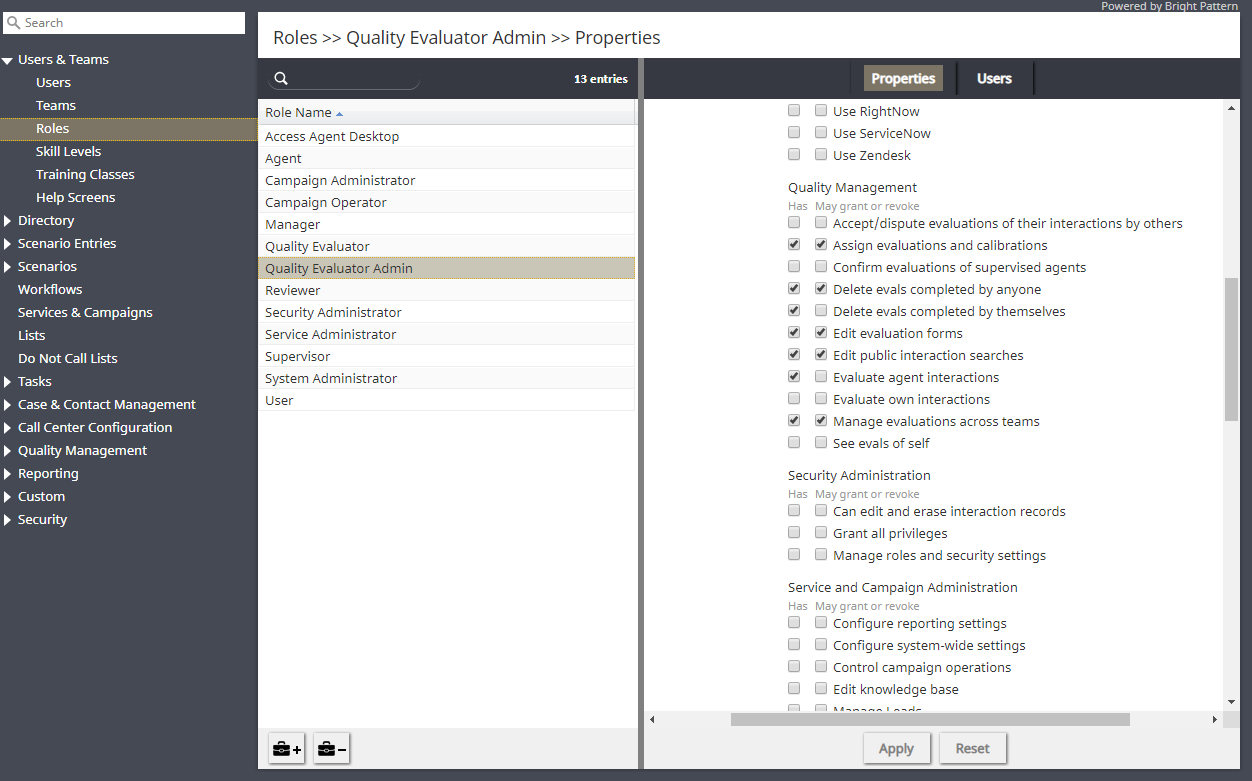
設定 > ユーザー & チーム > 役割> プロパティタブ - 役割名の欄から役割を選択します (エージェント,スーパーバイザ, 品質評価者, 品質評価者の管理者)。それらの役割に付与されている事前定義済みの品質管理権限に必ず注意してください。
- 次に、上部のユーザータブをクリックします。ここでは、関連する権限を持つ各役割に現在割り当てられているユーザーが表示されます。
- 画面の下部にあるユーザーの割り当てボタンをクリックして、特定の役割にユーザーを追加します。示されている例では、ユーザーを品質評価者の役割に割り当てます。
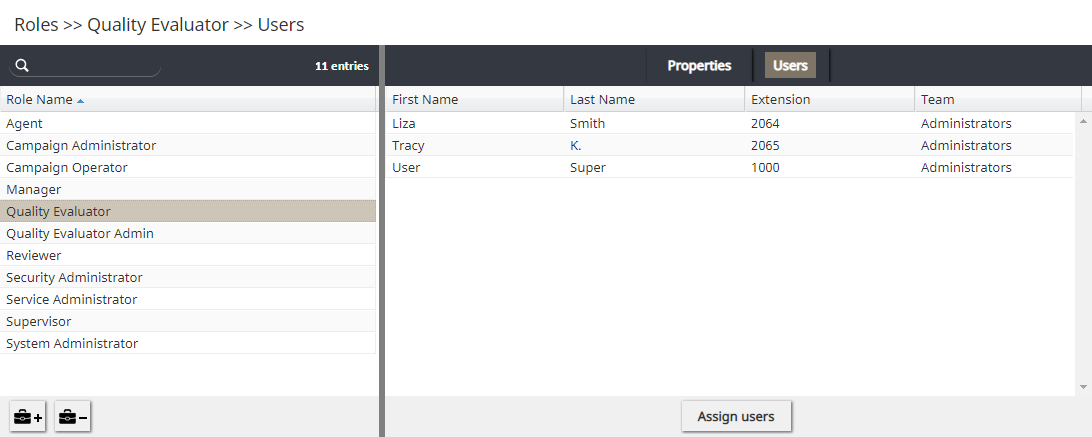
ユーザータブ - In the dialog that opens, select names from the Available Users column, move them to the Assigned Users column, and click OK.
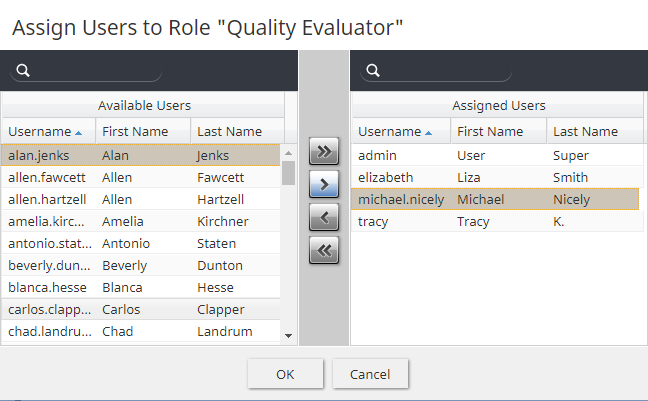
Assigning users - Important: When you assign users to the Quality Evaluator and Quality Evaluator Admin roles, you must also assign those users to a Team. This is required because these roles are meant for evaluators (i.e., users whose main job will be to evaluate interactions in Eval Console).
- To assign evaluators to a team:
- Go to Configuration > Users & Teams > Teams.
- Select a team from the Team Name column.
- In Properties, in Evaluators, click edit to add or remove users as assigned evaluators for the team.
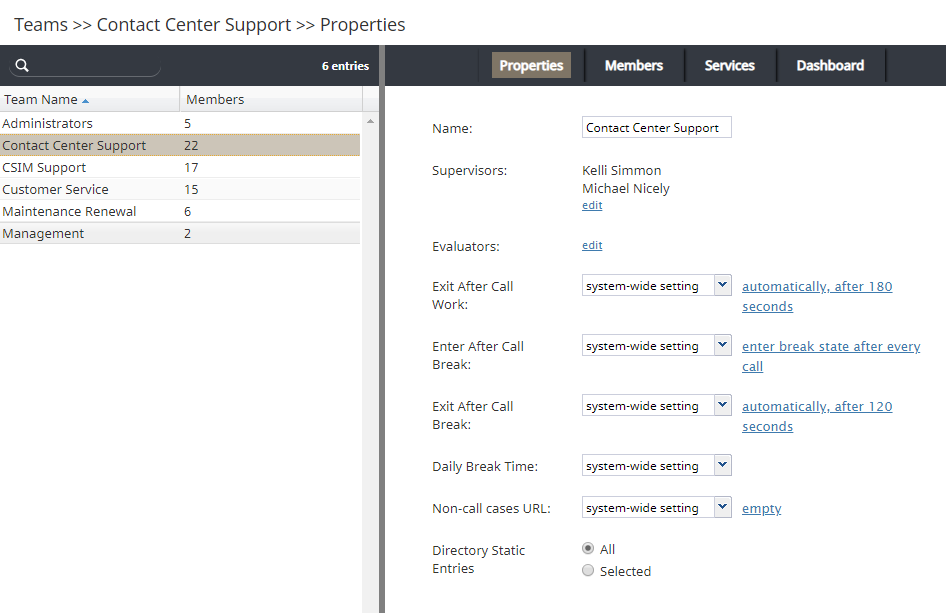
Adding evaluators
- Go to Configuration > Users & Teams > Teams.


